How to create a free anonymous email account


Most people use email every day without realizing how much personal information it can expose. A single email address can be tied to your online accounts, purchases, sign-ups, and communication patterns, which together can reveal your identity, location, and online habits. For anyone who values privacy, that’s a problem.
A free anonymous email account gives you a way to communicate without linking messages to your real identity. It’s a simple step that helps you keep control over what you share and with whom.
In this guide, you’ll learn what anonymous email accounts are, how they work, and how to create one safely and privately.
Please note: “Anonymous email” is a commonly used general term for email services that allow sign-up with little or no personal information. These services can enhance your privacy, but note that no service can offer complete anonymity. Some technical data still gets processed briefly to keep accounts secure and prevent automated abuse. Your level of privacy also depends on how and where you use the account.
What is a free anonymous email account?
Anonymous email services let you send and receive messages without attaching any personal information to the address. Unlike standard email providers, anonymous services let you sign up with minimal or no personal data.
Most of these services also apply additional privacy protection. This can include end-to-end encryption (E2EE), zero-access storage that keeps message content private even from the provider, and open-source apps that anyone can review.
Some anonymous email providers avoid storing IP addresses beyond short anti-abuse checks, which is why signups from virtual private network (VPN) or Tor connections may trigger delays or additional verification steps. These measures are designed to prevent automated sign-ups, not to identify the user. Anonymous providers may also block trackers (to prevent advertisers from learning when or how you opened an email) and/or limit metadata collection and retention.
Understanding the difference between anonymous email and email masking is important. Anonymous email gives you a separate inbox that isn’t connected to your identity. Email masking creates temporary or alternate addresses that forward to your main account. Masking reduces how often you share your real email, but it doesn’t replace a private inbox.
How it differs from standard email services
Most traditional email services, like Gmail or Outlook, are built around convenience and integration. They often connect to useful services such as calendars and cloud storage, but that increases the amount of sensitive data associated with you. To create an account, you also usually need to provide personal details such as your full name, phone number, or recovery email. IP logs may be stored long-term, too.
In addition, traditional services tend to offer relatively basic privacy features; Gmail, for example, includes built-in security scanning and, if you buy a Google Workspace plan, tools like Confidential Mode. This lets users set expiration dates (limiting how long an email you’ve sent can be read) and Confidential Mode messages and their attachments cannot be forwarded, printed, or downloaded. However, individual Gmail accounts within the Google Workspace still require a lot of personal data and E2EE is only available in the Enterprise plan, which is targeted towards large businesses.
Who needs an anonymous email account?
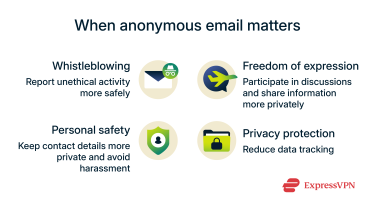
- People involved in whistleblowing or investigative work: Anonymous emails can help reduce how much personal information is tied to messages, allowing people who share sensitive information to exchange details with more privacy and without linking messages to their real names or accounts.
- People living in places where online expression is restricted: Anonymous email can make it harder to link communication to a real identity, letting people communicate, share information, or provide feedback with added privacy. It also allows them to participate in discussions or contact organizations safely without linking messages back to their real name or location.
- People who want more personal safety and privacy online: Using a secondary anonymous address can help keep your main email off spam lists or leaked databases. It's also useful when dating online, buying or selling items, or joining discussions where revealing your personal address might invite unwanted contact.
- People who want more control over their digital footprint: Privacy-focused email services don’t scan your inbox to gain data for profiling. Using separate anonymous addresses for each new online account can also help you spot sources of phishing and other scam emails: if a message lands in the inbox of an address used only once, you’ll know exactly which service leaked it.
Is it legal to use anonymous email services?
Anonymous email services are legal in many places when used for legitimate purposes such as protecting personal privacy or avoiding harassment. Broader privacy protections and free speech laws support the right to communicate more privately in many jurisdictions.
However, anonymous email services don’t remove accountability. Using these services to engage in illegal activity, such as fraud and harassment, can still lead to legal consequences.
Law enforcement may request user information from these services through proper legal procedures if there is a valid reason.
Why choose a free anonymous email account over paid options?
Both free and paid anonymous email services focus on privacy, but they differ in scope. A free plan covers basic needs, while paid options usually expand storage and security features.
When free is enough
Free anonymous email accounts can work well for selective privacy rather than comprehensive protection. They’re suitable for occasional tasks like signing up for a service, testing a product, or joining a newsletter without exposing your main inbox to spam or tracking. They’re also useful for occasional sensitive communications, such as reports or the sending of confidential information.
What you might be missing with free plans
Free tiers cover the basics, but paid anonymous email accounts expand what you can do. They’re built for people who handle larger volumes of messages, manage several addresses, or need extra reliability for work or business.
| Feature | Free plan limitation | What paid plans add |
| Storage | Small capacity (often 500MB–1GB) | Larger space for long-term email storage and bigger attachments (up to 500GB in some cases) |
| Aliases | Usually one address or a few aliases | Multiple addresses to organize communication under different identities |
| Custom domains | Not available | Lets users connect their own domain name (e.g., @mybusiness.com) for professional or branded use |
| Support | Community forums or FAQs only | Priority customer support |
| App integration | Limited to web or mobile app | Provides Internet Message Access Protocol (IMAP) / Simple Mail Transfer Protocol (SMTP) or bridge tools to connect with desktop clients like Thunderbird or Outlook |
Security considerations
The security of an anonymous email service depends on how it handles encryption, data storage, and transparency. Many privacy-focused providers apply the same encryption standards and no-logs and open-source policies across both free and paid plans.
While paid plans might include more storage and support options alongside other convenient features, a well-designed free plan often provides a similar level of privacy protection.
What to look for when creating an anonymous email account
Setting up an anonymous email is a straightforward process. The idea is to create an account that doesn’t link back to your personal information and keeps your communication private. The hardest part is choosing the right service; from there, all you have to do is sign up and pay if needed.
Choose a provider with the right features
In general, it’s best to choose options that collect as little information as possible, offer transparent security practices, and use strong encryption to keep your messages secure.
The key is to choose a provider that supports privacy through its default features, not through extra steps or add-ons. The following are the most important features these services use to back up their claims:
No logs, open source, strong encryption
A trustworthy anonymous email service keeps your data private by design. Three features help make that possible:
- No logs: The service shouldn’t store details like your IP address or when you sign in. If no records exist, there’s nothing to share or leak later.
- Open source: Services that publish their code allow security experts to check how everything works. This helps confirm that the system is secure and that there are no hidden vulnerabilities.
- Strong encryption: End-to-end encryption (E2EE) is crucial, as it ensures only you and the person you contact can read your emails. Some services also use “zero-access” systems, which means the provider can’t see what’s stored in your inbox.
Temporary vs. permanent accounts
Anonymous email services usually fall into two categories:
- Temporary accounts (burner emails): These exist only for a short time and are useful for one-off actions like signing up for a website or sending a single email. When deleted, they erase all messages and any trace of your activity.
- Permanent anonymous accounts: These work like regular email but with stronger privacy features. They allow long-term communication without linking messages to your real identity. Permanent accounts may offer more stability while keeping your personal details private.
Anonymous email signup (no phone, no backup email)
Find a service that keeps the signup process simple and private. Avoid services that require personal details such as a phone number, real name, or backup email. If a service includes optional fields, you can leave them blank or fill them with information unaffiliated to you, like a random username.
Note: For stronger privacy, you can also sign up using a VPN to prevent your real IP address from being associated with the account. A VPN encrypts your internet traffic and replaces your real IP address with that of a secure server, making it harder to link your account activity back to you.
How secure are free anonymous email accounts?
The level of security in a free anonymous email account varies by provider. Some use E2EE and limit data collection, while others include ads or analytics that can reduce privacy.
Understanding metadata exposure
Even when your email content is fully encrypted, some surrounding details, known as metadata, can still reveal traces of your activity. Metadata includes information like who you contact, when you send a message, and the frequency of your email exchanges. Unless the service encrypts subject lines, those can also remain visible.
This information might appear innocuous on its own. However, over time, it can outline communication patterns or connections. It provides context about your habits without exposing what was said.
Anonymous email providers can reduce this risk in two main ways. They may limit what’s collected through strict no-logs policies as mentioned below, and/or add some extra protection by encrypting subjects, folders, or other inbox details.
Do anonymous email providers keep activity logs?
Whether an anonymous email service logs user activity depends on its policies and infrastructure. Ad-funded providers frequently capture details like login times, device type, and IP address. They can sell this metadata to advertisers to further support their business models.
On the other hand, subscription-funded or donation-funded services often prevent inbox profiling and ad targeting, adopting no-logs policies. Some technical metadata may still be processed briefly, but it’s usually deleted once the session ends.
Note that providers must still comply with local laws if presented with a valid legal order to hand over user data. Having no stored logs minimizes what can be shared.
How IP addresses are handled
Your IP address can reveal your approximate location, so how an email service manages it is an important privacy factor. Anonymous email services prioritize privacy by removing identifying data, including IP addresses, before messages leave their servers.
Some may still process your IP address briefly for connection stability or anti-spam checks, but many providers don’t store or tie this data to your account as part of a no-logs policy.
Advanced tips to increase online privacy
Please note: No tool can guarantee complete anonymity online, but some of these tips can reduce the amount of identifying data that’s exposed.
Using a private email service is a strong first step, but the way you connect, browse, and maintain your devices can reveal a lot of personal information.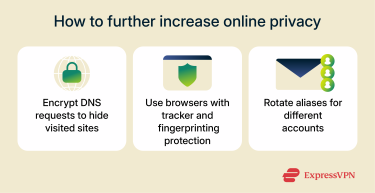
Use encrypted DNS and privacy-focused browsers
Even when a website uses HTTPS, your internet provider can still see which sites you visit through your Domain Name System (DNS) requests. Using encrypted DNS helps block that visibility by protecting the “name request” your device sends each time you visit a site. Services like Cloudflare and Quad9 support this feature and are known for their strong privacy policies and fast performance.
Switching to a browser that prioritizes privacy also makes a big difference. Options such as Firefox (with Enhanced Tracking Protection set to Strict), Brave, or the Tor Browser are built to block trackers and reduce how much data websites can collect about your device.
Rotate your email identities over time
If you use the same email address for every account, it becomes easier for companies and trackers to connect your online activities. To avoid that, use different email aliases or temporary addresses for each online account.
Some services also provide anonymous email forwarding, which creates unique forwarding addresses to help keep your main inbox private and reduce spam. Masking tools like Addy.io also make it easier to separate accounts and limit how much information can be linked back to you.
Avoid browser fingerprinting and device profiling
Some websites can recognize users even without cookies by analyzing small details about their browser or device, like fonts, screen size, or operating system version. This process, called browser fingerprinting, can generate a unique identifier that follows you across the web.
Some browsers are built to minimize this kind of tracking. Firefox and Tor Browser, for example, limit what websites can detect about your setup and standardize details that prevent your device from being uniquely identifiable.
FAQ: Common questions about free anonymous email accounts
Can I get a completely anonymous email for free?
No email service, free or paid, is completely anonymous. However, privacy-focused providers let you create an account without sharing personal information like your name or phone number. Free tiers usually include strong encryption and no-logs policies that protect your data from tracking.
Are free anonymous email accounts truly untraceable?
Not completely. Even private services need to process minimal technical data, such as temporary IP information, to prevent spam or misuse. With reputable anonymous email services, this data is usually deleted soon after each session. Overall, free anonymous email accounts have the potential to be highly private but not entirely untraceable.
How anonymous are temporary email services?
Temporary or “burner” email services delete all data after a short time, making them ideal for account signups or a quick conversation. They don’t store personal details or require registration, which keeps them lightweight and private. However, they’re not suitable for long correspondence or storing important messages.
What’s the difference between permanent anonymous email accounts and burner email accounts?
Anonymous email accounts are built for long-term privacy and secure communication, offering encryption and minimal data collection. Burner accounts are temporary; they exist only briefly and delete everything afterward. In short, one protects your identity over time, while the other erases traces after short-term use.
Can I use an anonymous email account for work or secure communication?
Yes, especially when you need privacy for sensitive exchanges. Free plans cover the basics, but paid versions add extra storage, aliases, and domain options. The core encryption and privacy standards usually remain the same across both.
Take the first step to protect yourself online. Try ExpressVPN risk-free.
Get ExpressVPN